Storage Hierarchy
CellarBoss supports nested storage structures, allowing you to model your physical cellar layout with arbitrary depth.
How It Works
Each storage can optionally have a parent storage. This creates a tree structure like:
Home Cellar (Location)
├── Room A (Storage)
│   ├── Rack 1 (Storage, parent: Room A)
│   │   ├── Shelf 1 (Storage, parent: Rack 1)
│   │   └── Shelf 2 (Storage, parent: Rack 1)
│   └── Rack 2 (Storage, parent: Room A)
└── Room B (Storage)
    └── Wine Fridge (Storage, parent: Room B)
Breadcrumb Display
When viewing storages in tables and detail views, the full hierarchy is displayed as a breadcrumb trail with chevron separators. Ancestor names appear in muted text, with the current storage highlighted.
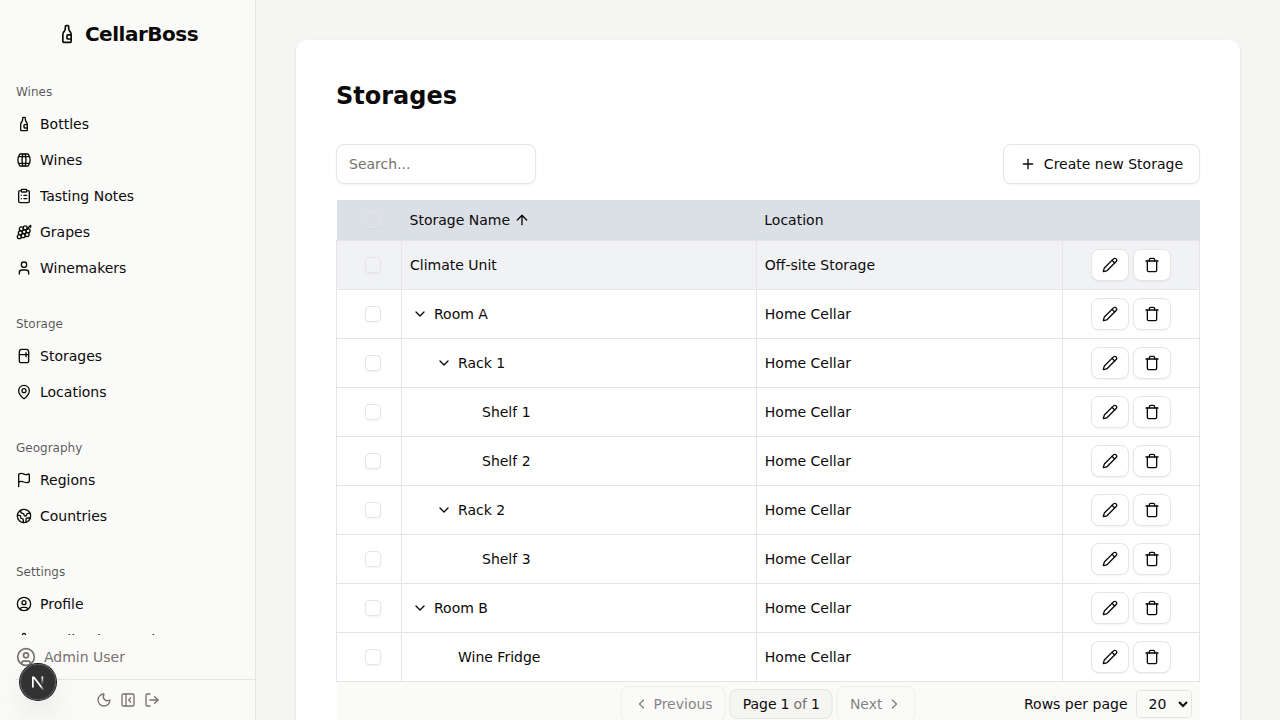
For example, a shelf might be displayed as:
Room A > Rack 1 > Shelf 1
Bottles in Sub-storages
A storage's page lists the bottles stored directly in it. When the storage has sub-storages, turn on Include sub-storages in the header of the Bottles section to also list every bottle held beneath it, at any depth. Each of those bottles shows its path from the current storage, such as Top Shelf > Left Box, so you know where to find it.
The setting is saved to your account, so it applies to every storage page on both the web and mobile apps until you turn it off.
Creating Nested Storages
When creating a new storage, select an existing storage as the Parent to nest it within that storage. Leave the parent empty to create a top-level storage within a location.
Moving Storages
To move a storage to a different parent, edit the storage and change its parent selection. All child storages will move with it, maintaining the hierarchy.
WARNING
A storage cannot be set as its own parent, and circular references are prevented.